顯示具有 99160025鍾毅軍 標籤的文章。 顯示所有文章

2013年1月13日 星期日

Week19,Final project

期末作業
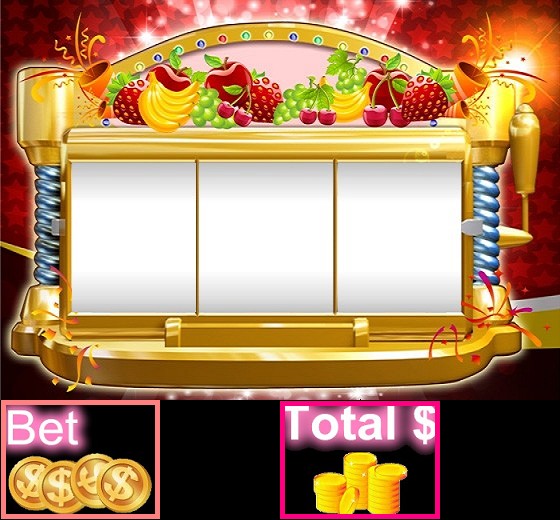
遊戲名稱:角子老虎


影片介紹&課堂DEMO


<程式部分 後面有全部的程式>

遊戲方法:
<遊戲登入畫面一  進入畫面>
1. 按任意鍵進入遊戲

<遊戲畫面二 介紹畫面>
2. 配錢方式:7--100$,其他水果--10$

<遊戲畫面三 開始拉罷>
3. 首先滑鼠左鍵點任意位置,下注金額Bet(左下角)

<遊戲畫面四 停止>
4.  接著按Arduino箱子Start按鈕--開始,1按鈕--第一格停止,2按鈕--第二格停止


先使用 processing 建置遊戲畫面


Processing  程式碼


PImage logo; // 登入畫面
PImage logo2; // 登入畫面
PImage gamebg;  //遊戲畫面
PImage bingo; int bingo_show=0; //當bingo時 顯示時間
int value = 0,login=0; int a1=1,a2=1,a3=1;
int sx=125,sy=150,sp=0,sp_2=0,sp_3=0,stop_1,stop_2,stop_3; //sx,sy水果大小
int h=-590; //h-&rt;小於h回到bp點
int x1=70,x2=200,x3=337;
int y11=160,y12=y11+150,y13=y12+150,y14=y13+150,y15=y14+150,y16=y15+150;
int y21=160,y22=y21+150,y23=y22+150,y24=y23+150,y25=y24+150,y26=y25+150;
int y31=160,y32=y31+150,y33=y32+150,y34=y33+150,y35=y34+150,y36=y35+150;
int total=1000,bet,bet_t,money_state=0;
int userlogin=1,login_y=0,login_h=560;//登入畫面
int[] sum = new int[3]; //計分 sum[0]=第一區,sump[1]=第二區...
PImage[] img1 = new PImage[6];//  載入圖片
PImage[] img2 = new PImage[6];//  載入圖片
PImage[] img3 = new PImage[6];//  載入圖片

int state1=0,state2=0,state3=0;

void setup(){
  size(560,520);
  logo = loadImage("login.jpg");  //背景圖
  logo2 = loadImage("fruit.png");  //背景圖
  gamebg = loadImage("gamebg.png"); //遊戲畫面
  bingo = loadImage("bingo.png");
  for(int i=0,j=1;i<6;i++,j++) //載注水果圖
    img1[i] = loadImage(j+".png");
  for(int i=0,j=1;i<6;i++,j++) //載注水果圖
    img2[i] = loadImage(j+".png");
  for(int i=0,j=1;i<6;i++,j++) //載注水果圖
    img3[i] = loadImage(j+".png");
  
  for(int i=0,j=1;i<3;i++,j++) //初始為0;
    sum[i]=0;
}

void draw(){
  
  background(255);
  keyPressed();
  
  if(userlogin==0)  
  {
    sp_rect1(x1,sp);
    sp_rect2(x2,sp_2);
    sp_rect3(x3,sp_3);
  }
  image(gamebg,0,0);
  
  if(sum[0]&rt;0&&sum[1]&rt;0&&sum[2]&rt;0){ //比較停格後的圖是否為相同
    println(sum[0]+" "+sum[1]+" "+sum[2]);
    if(sum[0]==sum[1]&&sum[1]==sum[2]){ 
      money(sum[0]);
      println("bingo");
      sum[0]=0;
      bingo_show=100;      
    }
    sum[0]=0;
    bet=0;
  }
  if(bingo_show&rt;0){  //bingo 圖 出現 , 顯示時間 bingo_show --
    image(bingo,180,300,174,48);
    bingo_show--;
  }
  fill(0, 102, 153);
  String mm = String.valueOf(total);  //顯示金額
  String b = String.valueOf(bet);    //顯示下注金額
  textSize(30);
  text(b, 165, 460,110,50);
  text(mm,445,460,110,50);
  money();
  
  loginimage();
  //println(userlogin);
} 
void loginimage(){
  if(userlogin==1) image(logo,0,0);
  if(mousePressed&&userlogin==1)
  {
    userlogin=2; image(logo2,0,login_y);
  }
  if(userlogin==2&&login_h&rt;=0){
    image(logo2,0,login_y--);
    login_h--;
  }
  if(userlogin==2&&login_h==0){
    userlogin=0; println("-----start game!!-----");
  }
}
void money(){  //下注 下注金額 不得超過100元
  if(bet<100){
    if(mousePressed&&userlogin==0){
        bet+=10;
        total-=10;
      }
    if (keyPressed == true&&userlogin==0){
      if(key=='.'){
        bet+=10;
        total-=10;
      }
    }
  }
}

void money(int sum){  //計算獎金
  switch(sum) {
    case 1: 
      print("total="+total+"+"+bet*100);
      total=total+bet*100;
      //print("total:"+bet_t);
      break;
    case 2:
      print("total="+total+"+"+bet*10); 
      total=total+bet*10;
      break;
    case 3: 
      print("total="+total+"+"+bet*10); 
      total=total+bet*10;
      break;
    case 4: 
      print("total="+total+"+"+bet*10); 
      total=total+bet*10;
      break;  
    case 5: 
      print("total="+total+"+"+bet*10); 
      total=total+bet*10;
      break;
    case 6: 
      print("total="+total+"+"+bet*10); 
      total=total+bet*10;
      break;
  }
}

void keyPressed() {
  if (key == ' '&&bingo_show==0&&bet&rt;=10) {  //start
    sp=5;
    sp_2=5;
    sp_3=5;
    state1=0;
    state2=0;
    state3=0;
    sum[0]=0;
    sum[1]=0;
    sum[2]=0;
    bet_t=bet;
    //print("bet:"+bet_t);
  }
  if (key == '1') {  //stop
    sp=0;
    state1=1;
    photo_up1(x1);
    //print("state:"+state);
  }
  if (key == '2') {  //stop
    sp_2=0;
    state2=1;
    photo_up2(x2);
    //print("state:"+state);
  }
  if (key == '3') {  //stop
    sp_3=0;
    state3=1;
    photo_up3(x3);
    //print("state:"+state);
  }

}

void sp_rect1(int x1,int sp_y1){  //讓水果轉動
       // 每張圖大小為 150*125 開始位置 70,160
      image(img1[0],x1,y11=y11-sp_y1,sx,sy); //sp=speed, sx,sy=scale
      image(img1[1],x1,y12=y12-sp_y1,sx,sy);
      image(img1[2],x1,y13=y13-sp_y1,sx,sy);
      image(img1[3],x1,y14=y14-sp_y1,sx,sy);
      image(img1[4],x1,y15=y15-sp_y1,sx,sy);
      image(img1[5],x1,y16=y16-sp_y1,sx,sy);
      if(y11<h){  //當圖y1小於h 就 貼到最後一張
        y11=y16+sy;
      }
      if(y12<h){
        y12=y11+sy;
      }
      if(y13<h){
        y13=y12+sy;
      }
      if(y14<h){
        y14=y13+sy;
      }
      if(y15<h){
        y15=y14+sy;
      }
      if(y16<h){
        y16=y15+sy;
      }
}

void sp_rect2(int x2,int sp_y2){  //讓水果轉動
       // 每張圖大小為 150*125 開始位置 70,160
      image(img2[0],x2,y21=y21-sp_y2,sx,sy); //sp=speed, sx,sy=scale
      image(img2[1],x2,y22=y22-sp_y2,sx,sy);
      image(img2[2],x2,y23=y23-sp_y2,sx,sy);
      image(img2[3],x2,y24=y24-sp_y2,sx,sy);
      image(img2[4],x2,y25=y25-sp_y2,sx,sy);
      image(img2[5],x2,y26=y26-sp_y2,sx,sy);
      if(y21<h){  //當圖y1小於h 就 貼到最後一張
        y21=y26+sy;
      }
      if(y22<h){
        y22=y21+sy;
      }
      if(y23<h){
        y23=y22+sy;
      }
      if(y24<h){
        y24=y23+sy;
      }
      if(y25<h){
        y25=y24+sy;
      }
      if(y26<h){
        y26=y25+sy;
      }
}
void sp_rect3(int x2,int sp_y2){  //讓水果轉動
       // 每張圖大小為 150*125 開始位置 70,160
      image(img3[0],x2,y31=y31-sp_y2,sx,sy); //sp=speed, sx,sy=scale
      image(img3[1],x2,y32=y32-sp_y2,sx,sy);
      image(img3[2],x2,y33=y33-sp_y2,sx,sy);
      image(img3[3],x2,y34=y34-sp_y2,sx,sy);
      image(img3[4],x2,y35=y35-sp_y2,sx,sy);
      image(img3[5],x2,y36=y36-sp_y2,sx,sy);
      if(y31<h){  //當圖y1小於h 就 貼到最後一張
        y31=y36+sy;
      }
      if(y32<h){
        y32=y31+sy;
      }
      if(y33<h){
        y33=y32+sy;
      }
      if(y34<h){
        y34=y33+sy;
      }
      if(y35<h){
        y35=y34+sy;
      }
      if(y36<h){
        y36=y35+sy;
      }
}
//--------------------------------------------------------------------

void photo_up1(int ux1)
{
  //-----第一張圖--------------------------
  if(state1==1) {  //偵測Y停點 ,儲存y數值
      //println("start");
        if(160<=y11&&y11<310){
          stop_1=y11;
          //print("y1");
          sum[0]=1;
        }
        if(160<=y12&&y12<310){
          stop_1=y12;
          //print("y2");
          sum[0]=2;
        }
        if(160<=y13&&y13<310){
          stop_1=y13;
          //print("y3");
          sum[0]=3;
        }
        if(160<=y14&&y14<310){
          stop_1=y14;
          //print("y4");
          sum[0]=4;
        }
        if(160<=y15&&y15<310){
          stop_1=y15;
          //print("y5");
          sum[0]=5;
        }
        if(160<=y16&&y16<310){
          stop_1=y16;
          //print("y6");
          sum[0]=6;
        }
        
    }
    

  if(stop_1&rt;160) //圖片往上到偵測區塊定點
  {
    //println(stop_y);
    //testsp(stop_y);
    image(img1[0],ux1,y11=y11-1,sx,sy); 
    image(img1[1],ux1,y12=y12-1,sx,sy);
    image(img1[2],ux1,y13=y13-1,sx,sy);
    image(img1[3],ux1,y14=y14-1,sx,sy);
    image(img1[4],ux1,y15=y15-1,sx,sy);
    image(img1[5],ux1,y16=y16-1,sx,sy);
    stop_1-=1;
  }
  
}


void photo_up2(int ux2)
{
  //--------第二張圖-----------------------------

  if(state2==1) {  //偵測Y停點 ,儲存y數值
      //println("start");
        if(160<=y21&&y21<310){
          stop_2=y21;
          //print("y1");
          sum[1]=1;
        }
        if(160<=y22&&y22<310){
          stop_2=y22;
          //print("y2");
          sum[1]=2;
        }
        if(160<=y23&&y23<310){
          stop_2=y23;
          //print("y3");
          sum[1]=3;
        }
        if(160<=y24&&y24<310){
          stop_2=y24;
          //print("y4");
          sum[1]=4;
        }
        if(160<=y25&&y25<310){
          stop_2=y25;
          //print("y5");
          sum[1]=5;
        }
        if(160<=y26&&y26<310){
          stop_2=y26;
          //print("y6");
          sum[1]=6;
        }
        
    }
  if(stop_2&rt;160) //圖片往上到偵測區塊定點
  {
    //println(stop_y);
    //testsp(stop_y);
    image(img2[0],ux2,y21=y21-1,sx,sy); 
    image(img2[1],ux2,y22=y22-1,sx,sy);
    image(img2[2],ux2,y23=y23-1,sx,sy);
    image(img2[3],ux2,y24=y24-1,sx,sy);
    image(img2[4],ux2,y25=y25-1,sx,sy);
    image(img2[5],ux2,y26=y26-1,sx,sy);
    stop_2-=1;
  }
} 
  
void photo_up3(int ux3)
{
  //---------第三張圖---------------------------
  
  if(state3==1) {  //偵測Y停點 ,儲存y數值
      //println("start");
        if(160<=y31&&y31<310){
          stop_3=y31;
          //println("y1");
          sum[2]=1;
        }
        if(160<=y32&&y32<310){
          stop_3=y32;
          //println("y2");
          sum[2]=2;
        }
        if(160<=y33&&y33<310){
          stop_3=y33;
          //println("y3");
          sum[2]=3;
        }
        if(160<=y34&&y34<310){
          stop_3=y34;
          //println("y4");
          sum[2]=3;
        }
        if(160<=y35&&y35<310){
          stop_3=y35;
          //println("y5");
          sum[2]=5;
        }
        if(160<=y36&&y36<310){
          stop_3=y36;
          //println("y6");
          sum[2]=6;
        }
    }
    

  if(stop_3&rt;160) //圖片往上到偵測區塊定點
  {
    //println(stop_y);
    //testsp(stop_y);
    image(img3[0],ux3,y31=y31-1,sx,sy); 
    image(img3[1],ux3,y32=y32-1,sx,sy);
    image(img3[2],ux3,y33=y33-1,sx,sy);
    image(img3[3],ux3,y34=y34-1,sx,sy);
    image(img3[4],ux3,y35=y35-1,sx,sy);
    image(img3[5],ux3,y36=y36-1,sx,sy);
    stop_3-=1;
  }
} 
 左邊第一顆按鈕為開始(Start),右邊第一顆按鈕為第一格停止鍵,
第二顆按鈕為第二格停止鍵,第三顆按鈕為第三格停止鍵。
 
Arduino 程式碼

// digital pin 2 has a pushbutton attached to it. Give it a name:
int pushButton1 = 7;
int pushButton2 = 6;
int pushButton3 = 8;
int pushButton4 = 9;

// the setup routine runs once when you press reset:
void setup() {
  // initialize serial communication at 9600 bits per second:
  Serial.begin(9600);
  // make the pushbutton's pin an input:
  pinMode(pushButton1, INPUT);
  pinMode(pushButton2, INPUT);
}

int oldState1=0;
int oldState2=2;
int oldState3=4;
int oldState4=6;
// the loop routine runs over and over again forever:
void loop() {
  // read the input pin:
  int buttonState1 = digitalRead(pushButton1);
  int buttonState2 = digitalRead(pushButton2);
  int buttonState3 = digitalRead(pushButton3);
  int buttonState4 = digitalRead(pushButton4);
  //----按鈕1----
  if(buttonState1==LOW && oldState1==0){  //按鈕1不按,訊號為0
  // print out the state of the button:
    Serial.print(0);
    oldState1=1;
  }
   if(buttonState1==HIGH && oldState1==1){  //按鈕1按下,訊號為1
  // print out the state of the button:
    Serial.print(1);
    oldState1=0;
  }
  //----按鈕2----
  if(buttonState2==LOW && oldState2==2){  //按鈕2不按,訊號為2
  // print out the state of the button:
    Serial.print(2);
    oldState2=3;
  }
  if(buttonState2==HIGH && oldState2==3){  //按鈕2按下,訊號為3
  // print out the state of the button:
    Serial.print(3);
    oldState2=2;
  }
  //----按鈕3----
  if(buttonState3==LOW && oldState3==4){  //按鈕2不按,訊號為2
  // print out the state of the button:
    Serial.print(4);
    oldState3=5;
  }
  if(buttonState3==HIGH && oldState3==5){  //按鈕2按下,訊號為3
  // print out the state of the button:
    Serial.print(5);
    oldState3=4;
  }
  //----按鈕4----
  if(buttonState4==LOW && oldState4==6){  //按鈕2不按,訊號為2
  // print out the state of the button:
    Serial.print(6);
    oldState4=7;
  }
  if(buttonState4==HIGH && oldState4==5){  //按鈕2按下,訊號為3
  // print out the state of the button:
    Serial.print(7);
    oldState4=6;
  }
  delay(10);        // delay in between reads for stability
}
心得介紹/組員分工情況 

由於這學期十分忙碌,許多課程都需要繳交期末作品,我們星期四考完期末考後便把時間都獻給互動期末作品了,星期五也繼續來在學校研究。主要分為兩大部分:Processing和Arduino,而工作分配由鍾毅軍負責Processing和吳姿儀負責Arduino。
Processing部分程式需要花時間Debug,這種方法不行就換別種方法。
Arduino部分線路常常接觸不良或者不牢固,導致在arduino接收訊號時會有問題,不是沒接收到就是一次跳太多訊號。以及按鈕的選擇似乎不恰當。
最後雖然還有些不足要修改,但還是謝謝和辛苦了!

2012年12月25日 星期二

Week15,HW12

期末構想:角子老虎機
 目前進度:
所需素材、登入畫面和遊戲畫面


登入畫面


遊戲畫面


素材

2012年12月4日 星期二

Week13,HW11

互動技術概論 Arduino 按鍵音樂 

程式碼


int inpin1=3;
int inpin2=4;
int inpin3=5;
int inpin4=6;
int inpin5=7;


int buttonState1 = 0; // variable for reading the pushbutton status
int buttonState2 = 0;
int buttonState3 = 0;
int buttonState4 = 0;
int buttonState5 = 0;

void setup() {
  
pinMode(inpin1, INPUT);
pinMode(inpin2, INPUT);
pinMode(inpin3, INPUT);
pinMode(inpin4, INPUT);
pinMode(inpin5, INPUT);


}

void loop() {
  buttonState1 = digitalRead(inpin1);
  buttonState2 = digitalRead(inpin2);
  buttonState3 = digitalRead(inpin3);
  buttonState4 = digitalRead(inpin4);
  buttonState5 = digitalRead(inpin5);

  if (buttonState1 == HIGH)  tone(9, 524,4);
  else if (buttonState2 == HIGH)  tone(9, 588,4);
  else if (buttonState3 == HIGH)  tone(9, 660,4);
  else if (buttonState4 == HIGH)  tone(9, 698,4);
  else if (buttonState5 == HIGH)  tone(9, 784,4);
  else {
  noTone(9);
  }


}

2012年11月27日 星期二

Week12,HW10

互動技術 ARDUINO 1127 練習

練習一燈泡循序漸進


練習二燈泡不按照規律亮燈


自由發揮創意
燈泡排成 菱形


練習三 程式碼:
int sensorPin = A0;    // select the input pin for the potentiometer
int ledPin = 13;      // select the pin for the LED
int sensorValue = 0;  // variable to store the value coming from the sensor

void setup() {
  // declare the ledPin as an OUTPUT:
  pinMode(13, OUTPUT); 
  pinMode(12, OUTPUT);
  pinMode(11, OUTPUT);
  pinMode(10, OUTPUT);
  pinMode(9, OUTPUT);
  pinMode(8, OUTPUT);
  pinMode(7, OUTPUT);
  pinMode(6, OUTPUT);
  Serial.begin(9600);
}

void loop() {
  // read the value from the sensor:
  sensorValue = analogRead(sensorPin); 
  Serial.println(sensorValue);  
  // turn the ledPin on  
  digitalWrite(6, HIGH); 
  delay(sensorValue); 
  digitalWrite(7, HIGH);
  delay(sensorValue); 
  digitalWrite(8, HIGH);
  delay(sensorValue);   
  digitalWrite(9, HIGH);
  delay(sensorValue);  
  digitalWrite(10,HIGH);
  delay(sensorValue); 
  digitalWrite(11, HIGH);
  delay(sensorValue);   
  digitalWrite(12,HIGH);
  delay(sensorValue);  
  digitalWrite(13, HIGH);    
  delay(sensorValue); 
    
  digitalWrite(6, LOW); 
  delay(sensorValue); 
  digitalWrite(7, LOW);
  delay(sensorValue); 
  digitalWrite(8, LOW);
  delay(sensorValue);   
  digitalWrite(9, LOW);
  delay(sensorValue);  
  digitalWrite(10, LOW);
  delay(sensorValue); 
  digitalWrite(11, LOW);
  delay(sensorValue);   
  digitalWrite(12, LOW);
  delay(sensorValue);  
  digitalWrite(13, LOW);    
  delay(sensorValue);   
  
  digitalWrite(13, HIGH);
  digitalWrite(12, HIGH); 
  digitalWrite(11, HIGH); 
  digitalWrite(10, HIGH);
  delay(sensorValue);
  digitalWrite(9, HIGH);
  digitalWrite(8, HIGH);
  digitalWrite(7, HIGH);
  digitalWrite(6, HIGH);
  delay(sensorValue);
  digitalWrite(6, HIGH);
  digitalWrite(7, HIGH); 
  digitalWrite(8, HIGH); 
  digitalWrite(9, HIGH);
  delay(sensorValue);
  digitalWrite(10, HIGH);
  digitalWrite(11, HIGH);
  digitalWrite(12, HIGH);
  digitalWrite(13, HIGH);
  delay(sensorValue);    
  // stop the program for <sensorValue> milliseconds:
  delay(sensorValue);          
  // turn the ledPin off:         
  
  digitalWrite(13, LOW); 
  delay(sensorValue); 
  digitalWrite(12, LOW);
  delay(sensorValue); 
  digitalWrite(11, LOW);
  delay(sensorValue);   
  digitalWrite(10, LOW);
  delay(sensorValue);  
  digitalWrite(9, LOW);
  delay(sensorValue); 
  digitalWrite(8, LOW);
  delay(sensorValue);   
  digitalWrite(7, LOW);
  delay(sensorValue);  
  digitalWrite(6, LOW);  
  delay(sensorValue);  
}

2012年11月20日 星期二

第十一周 作業 arduino

arduino 作業想法

arduino+processing 可以做出 簡單的計時器

下面的影片中
製作LED的時鐘
每個顏色個別為時分秒

在這作品中
最難的事 計時分配
要如何知道 每一個分配出來的燈炮及程式對應的效果


2012年11月13日 星期二

Midterm

Midterm 期中作品

1. 執行成果:

遊戲名稱:棒球轟不讓
遊戲方法:登入遊戲畫面點選開始遊戲按鈕,遊戲開始時玩家利用滑鼠搖動以及點擊控制球棒揮動角度,棒球會從投手位置投球出來,要打擊目標物為上方酒瓶,打中會加一分,沒打中不會扣分,時間限制為一分鐘。遊戲結束畫面會依分數有無達到規定跳出成功/失敗畫面。

Demo影片
成果截圖


 遊戲登入畫面,點選開始遊戲按鈕(紅箭頭指向處)。


 遊戲開始畫面,分別有clock時間軸來記錄時間、grade記分板來記錄分數、
bat球棒為玩家揮動控制、ball棒球會從pitcher投手丟向bat球棒、
wine酒瓶為要打擊的目標物。


 遊戲結束畫面-闖關成功,score分數>13分為遊戲成功。


遊戲結束畫面-闖關失敗,score分數<12分為遊戲失敗。

2. 程式碼:

/*宣告放音樂函式*/
import ddf.minim.*;
import ddf.minim.analysis.*;
Minim minim;
AudioPlayer song;
PImage login,gamebg,win,lose,pitcher,bat,ball,wine1,wine2,wine3,clock;
PImage [] num = new PImage [10];
Timer timer,timer2;
int bg=1,s1=0,s2=0,s=0,score=0;
int lastTime=60;  //時間60秒
float wine1x=0,wine2x=100,wine3x=230,wine4x=300,wine5x=450,rect_x=0;
float bangangle=0;
float bx=480,vx=0,nx=0;
float by=150,vy=0,ny=0;
float x,y,a,b;
int state=0,stateBall;
float inner;
void setup() {
  size(640,500);  //視窗大小
  /*放音樂,音樂要儲存在processing檔案資料夾下*/
  minim = new Minim(this);
  song = minim.loadFile("baseball.mp3", 2048);
  /*載入圖片*/
  login = loadImage("login.jpg");
  gamebg = loadImage("gamebg.jpg");
  win = loadImage("win.jpg");
  lose = loadImage("lose.jpg");
  wine1 = loadImage("wine1.gif");
  wine2 = loadImage("wine2.gif");
  wine3 = loadImage("wine3.gif");
  pitcher = loadImage("pitcher.gif");
  ball = loadImage("ball.gif");
  bat = loadImage("bat.gif");
  clock = loadImage("clock.gif"); 
  for(int i=0;i<10;i++){
    num[i]=loadImage(""+i+".jpg");
  }
}
float sx=-3,sy=0.48;//error 1, not local variable
void ball(){  //球棒
   bx=bx+sx; by=by+sy;//error 3, need to modify (bx,by)
   if(bx>0&&state==0){
      //bx=bx+sx; by=by+sy;//error 3, need to modify (bx,by)
     if(bx<=150&&state==0){
       state=1;
       //println("state=1");
     }
      else if(bx<10&&state==0){
        bx+=480; by-=50;
      }
    }  
    if(state==1){
     inner=vx*sx+vy*sy;
      sx=2*(sx-2*inner*vx);
      sy=2*(sy-2*inner*vy);
      print(sx+"\n"+sy+"\n");
      state=2;//error 2, always collision
      stateBall=0;
    }
    if(bx>640||bx<0||by<0||by>448)
    { sx=-1*6+random(1); sy=(94+random(2))/100;
      bx=480; by=150;
      bx=bx+sx; by=by+sy;
      state=0;
    }
  image(ball,bx,by);
  //point(bx+25,by+25); //球棒中心點bx+25,by+25
//  print("bx:"+(bx+25)+" by:"+(by+25)+"\n");
//  print("dx:"+bx+" dy:"+by+"\n");  //球速向量dx,dy
}
void bat(){  //球棒
  pushMatrix();
    translate(150,350);
    rotate(bangangle);
    translate(-17,-180);
    image(bat,0,0,70,200);
    stroke(255,255,0);//Line color
    strokeWeight(10);//line size
    //line(17,0,17,200);//draw line
    stroke(255,0,0);//Line color
    //line(17,50,100,50);//球棒法線
  popMatrix();
  //point(150,350);
 // print("batangel:"+bangangle+"\n"); 
  vx=cos(bangangle);  //球棒向量vx,vy
  vy=sin(bangangle);
 // print("vx:"+vx+" vy:"+vy+"\n");
  nx=-2/vx;  //球棒法向量nx,ny
  ny=1/vy;
 // print("nx:"+nx+" ny:"+ny+"\n");  
  a=tan(bangangle);
  b=350-150*a;   
}
void winemove(){  //酒瓶移動
  if(wine1x<640){
    wine1x+=1;
    if(wine1x==640){
      wine1x-=640;
    }
    if(bx>=wine1x && bx<wine1x+50 && by<100 && stateBall==0)
     { s++; stateBall=1;}
  }
  image(wine1,wine1x,0);  
  if(wine2x<640){
     wine2x+=1;
     if(wine2x==640){
       wine2x-=640;
     }
     if(bx>=wine2x && bx<wine2x+50 && by<100 && stateBall==0)
     { s++; stateBall=1;}
  }
  image(wine2,wine2x,0);  
  if(wine3x<640){
    wine3x+=1;
    if(wine3x==640){
      wine3x-=640;
    }
    if(bx>=wine3x && bx<wine3x+50 && by<100 && stateBall==0)
     { s++; stateBall=1;}
  }
  image(wine3,wine3x,0); 
  if(wine4x<640){
    wine4x+=1;
     if(wine4x==640){
       wine4x-=640;
     }
     if(bx>=wine4x && bx<wine4x+50 && by<100 && stateBall==0)
     { s++; stateBall=1;}
  }
  image(wine1,wine4x,0);
  if(wine5x<640){
    wine5x+=1;
    if(wine5x==640){
      wine5x-=640;
    }
    if(bx>=wine5x && bx<wine5x+50 && by<100 && stateBall==0)
     { s++; stateBall=1;}
  }       
  image(wine2,wine5x,0);
}
void grade(){  //記分板
  s1=s%10; 
  image(num[s1],560,348,60,80); //個位數
  s2=s/10;
  image(num[s2],500,348,60,80); //十位數
}
void clock(){  //時間軸
  noStroke();
  fill(0);
  rect(0,448,640,52);
  image(clock,0,448,40,52);  //起點鐘
  image(clock,600,448,40,52);  //終點鐘
  //bug2-->下排時間軸不準確會有誤差!!(喊一秒)//bug1-->登入畫面時計時器便開始計時了!!
  lastTime=60-millis()/1000;
  if(lastTime>0){
    fill(255);
    rect_x+=0.16;
    rect(43,448,rect_x,600);
  }else if(lastTime<=0){
    fill(255);
    rect(43,448,rect_x,600);
  }
}
void draw() {
  if(bg==1){  //登入遊戲畫面 
     image(login,0,0,640,500);
     if(mousePressed && mouseX>=150 && mouseX<=500 && mouseY>=380 && mouseY<=500){
       image(gamebg,0,0);     
       bg=2;
       //print("進入遊戲\n");
     }
  } 
  if(bg==2){  //遊戲開始畫面
    song.play();  //音樂播放
    image(gamebg,0,0,640,448);
    image(pitcher,450,100);
    winemove();  //酒瓶移動
    grade(); //記分板
    clock();  //時間軸
    ball();   //棒球
    bat();  //球棒
    //print("a=  "+a+"\nb=  "+b+"\n");
    if(lastTime<=0){
      bg=3;
      if(s>=12){
        image(win,0,0,640,448);  //贏畫面
        grade();
      }else if(s<12){
        image(lose,0,0,640,448);  //輸畫面
        grade();
      } 
    }
  }
  //print("ny/nx="+ny/nx+"\n");
}
/*void keyPressed() {
  if (key==' ')  s++;
}*/
void mouseDragged()
{
  bangangle=1/2*PI-mouseX/150.0;  //球棒角度bangangle
}

3. 心得:

在做互動期中作品中遇到許多問題,有些有解決而有些無法如預期結果。我們不斷地努力測試和debug,經由這次期中作品知道自己有許多不足和加強的地方得再接再厲。
以下是遇到的問題與討論:
(1) 時間部分會有小小的誤差,從執行開始的登入畫面時間就開始計時了。
(2) 棒球和球棒部分是這次作品最大的問題,必須考慮球反彈的角度、速度等等,計算棒球和球棒的向量、法向量、斜率等等。這個部份讓我們頭痛好久,雖然還是有不足的地方。謝謝老師不厭其煩地教導。
(3) 程式碼部分寫起來有點混亂,可以再濃縮和整理。


2012年10月30日 星期二

Week08,HW08

8-1 上週完成了進度:
(1) 遊戲登入畫面按"開始遊戲"會進入遊戲畫面。
(2) 調整材質大小以及去背。


8-2 本週計畫進度:
遊戲畫面
(1) 酒瓶(目標物)來回移動
(2) 球棒可依滑鼠移動而揮動
(3) 投手圖片、球圖片放上遊戲畫面
(4) 球棒打擊到球飛處去的角度


8-3 可能會遇到的問題:
(1) 球棒打擊到球飛出去的角度(向量)
(2) 酒瓶來回移動(在x軸)
(3) 球棒揮動(T-移動,R,T-軸心)


2012年10月23日 星期二

Week07,HW07

7-1 期中作品

登入遊戲畫面
 點選開始遊戲切換到下一個場景(遊戲畫面)

遊戲畫面


7-2 視訊

2012年10月16日 星期二

H6

1.有許多同學 的構思 都是由網路上的遊戲想來的
很有特色
但缺少了自己的想法
希望 大家可以 再有不一樣\的 創意結果

例如 章魚燒 可以碰到 燒焦或未熟的效果
讓遊戲更完整 更有刺激感

2.素材
 
遊戲登入畫面
 
 
棒球(玩家)與球


目標物
 
投手

出局畫面


闖關成功畫面
 
 
*遊戲方式:登入遊戲畫面點選開始按鍵開始遊戲,玩家打擊投手(電腦)所投出的球,球速會依等級增加而變快、角度也會隨機變換,玩家使用滑鼠移動左右會在固地位置揮動球棒,若有觸碰到球會打出去,球會依照球棒的角度飛行出去。若擊中目標物會得分,沒擊中不扣分,以及有時間限制。有開始按鍵和再玩一次按鍵。

*流程:
1. 登入遊戲畫面(有開始按鍵)--->載入圖片、按鈕
2. 點下開始按鍵進入開始遊戲畫面
(1) 載入背景圖、投手圖、玩家圖、目標物圖、計分計時板圖、棒球/球棒圖、檯子圖
(2) 背景圖固定不變
(3) 投手會從投手那向玩家投球(按開始按鍵進入開始遊戲畫面時等待3秒計時器開始計算以及投新球)
(4) 球棒把球打擊出去(棒球和球的角度可以用"向量"解決)
(5) 球超過某條線(pixels值)代表此球已結束,投手等待2秒便可投下一顆球
(6) 目標物會左右來回移動(被打中就消失)
(7) 打中目標物計分器會加分10分
(8) 計時板(按開始遊戲按鍵時間開始)
3. 背景音樂按開始按鍵同時播放
4. 時間到遊戲結束->出局畫面、闖關成功畫面(依照分數超過多少)


2012年10月9日 星期二

W05

一朵花


void setup(){
  size(600,600);
}
void draw(){
  translate(300,300);
  
  fill(255,0,0);
  
  for(int i=0;i<10;i++){
    rotate( PI/5);
    ellipse(80,0,100,40);
  }
  
  fill(0,255,0);
  ellipse(0,0,80,80);
  
  fill(0);
  ellipse(-10,-10,10,10);
  ellipse(10,-10,10,10);
  
  noFill();
  
  arc(0, 0, 60, 60, 0, PI);

} 

會動的花
void setup(){
  size(600,600);
}
float rr=0.01;
void draw(){
  translate(300,300);
  background(0,0,0);
  fill(0,50,0);
  rect(-5,0,10,200);
  
  pushMatrix();
    rotate(rr); rr+=0.01;
    
     float c = random(255);
     
    for(float i=0;i<10;i++){
      fill(c*25,c,255/i); 
      rotate( PI/5);
      ellipse(80,0,100,40);
    }
  popMatrix();
  
  fill(0,255,0);
  ellipse(0,0,80,80);
  fill(0);
  ellipse(-10,-10,10,10);
  ellipse(10,-10,10,10);
    
  noFill(); 
  arc(0, 0, 60, 60, 0, PI);
  
} 

互動的花
1.太陽可以動
2.花會有笑臉和哭臉
3.花瓣顏色會跟著滑鼠改變顏色

void setup(){
  size(600,600);
}
float rr=0.01;
float a,b;
void draw(){
  translate(300,300);
  
  float r,b,g;
  

  background(153,271,234);
  //background(0,0,255);
  
  
  fill(0,50,0);
  rect(-5,0,10,200);
  
  float x=mouseX,y=mouseY;
  float len=sqrt(x*x+y*y)/3;
  
  
  pushMatrix();
    rotate(rr); rr+=0.01;
    
     float c = random(255);
     
    for(float i=0;i<10;i++){
      fill(c*25,len,255/i); 
      rotate( PI/5);
      ellipse(80,0,100,40);
    }
  popMatrix();
  
  fill(0,255,0);
  ellipse(0,0,80,80);
  fill(0);
  ellipse(-10,-10,10,10);
  ellipse(10,-10,10,10);
    
  noFill(); 
  if(mouseX<300)
  {
    arc(0, 0, 50, 50, 0, PI);
  }
  else if (mouseX<600)
  {
   arc(0, 20, 50, 40, PI, 2*PI);
  }
  
  
  pushMatrix();
  float ty=mouseY;
  if(mouseY<300) ty=mouseY-300;  else ty=0;
  translate(mouseX-300,ty);
  fill(255,255,0);
  ellipse(0,0,80,80);
  popMatrix();
  
  
} 


第三題
期中專題想做題目與類型

棒球遊戲
圖片出處:http://www.gamersenterprise.com/play.php?act=play&id=1582&name=Chicken-Little-Batting-Practice